
Modern.js v3 Release: Fully Embracing Rspack
Published on 2025.02.06
Introduction
It has been three years since the Modern.js 2.0 release. We sincerely thank the community developers for using and trusting Modern.js. Modern.js has maintained a steady iteration pace, with over 100 versions released.
Over these three years, we have continuously added new features, performed code refactoring and optimizations, and received extensive community feedback. These experiences have become important references for the improvements in version 3.0. After careful consideration, we decided to release Modern.js 3.0, delivering a comprehensive upgrade to the framework.
The Evolution from Modern.js 2.0 to 3.0
From Modern.js 2.0 to 3.0, there are two core transformations:
More Focused: Dedicated to Being a Web Framework
- Modern.js 2.0: Included Modern.js App, Modern.js Module, and Modern.js Doc
- Modern.js 3.0: Represents only Modern.js App. Modern.js Module and Modern.js Doc have been incubated into Rslib and Rspress
More Open: Actively Embracing Community Tools
- Modern.js 2.0: Built-in various tools with framework-specific API designs
- Modern.js 3.0: Strengthened plugin system, improved integration capabilities, and recommends high-quality community solutions
What's New in Modern.js 3.0
React Server Component
Modern.js 3.0 integrates React Server Component, supporting both CSR and SSR projects with progressive migration.
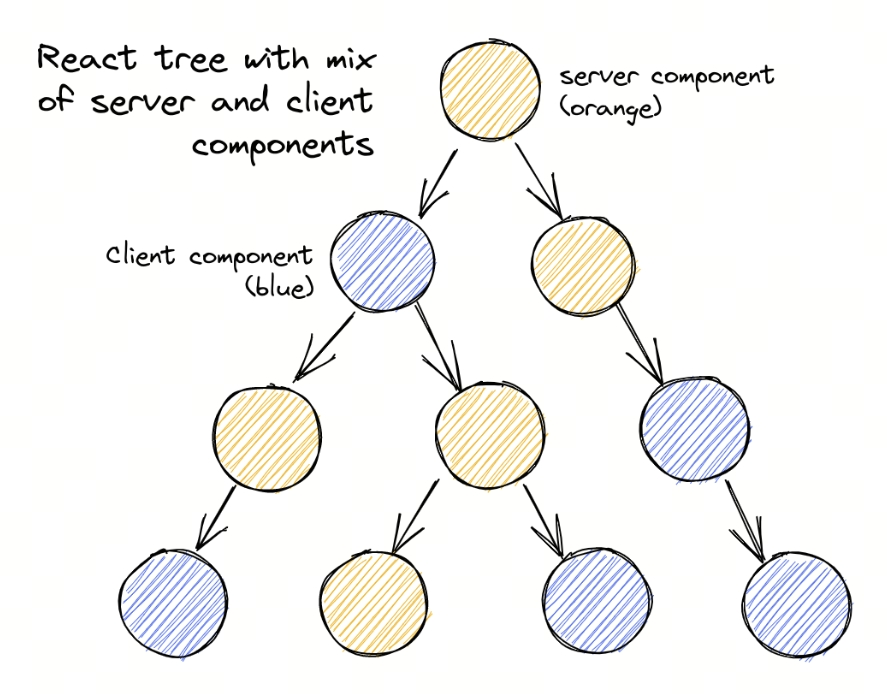
What is React Server Component
React Server Components (RSC) are a new type of component that allows component logic to execute entirely on the server, streaming the rendered UI directly to the client. Compared to traditional client components, Server Components offer the following benefits:
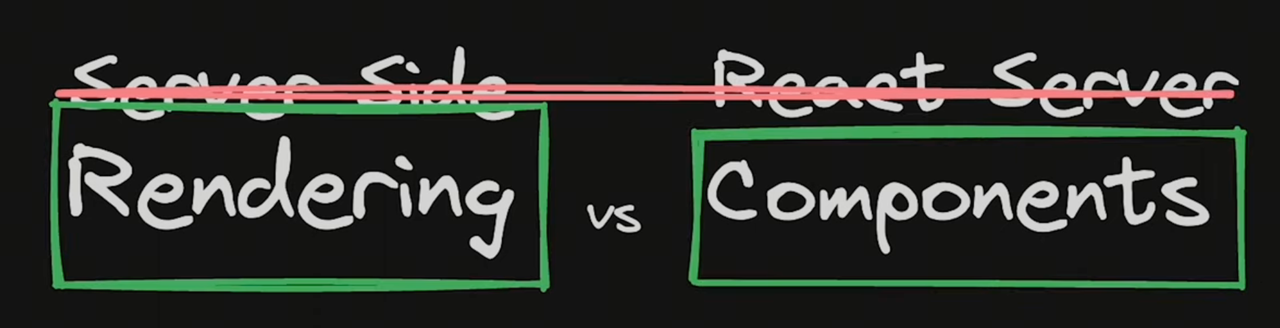
It's important to clarify that RSC and SSR are fundamentally different concepts:
- RSC: Describes the component type — where the component executes (server vs. client)
- SSR: Describes the rendering mode — where the HTML is generated (server vs. client)
The two can be used together: Server Components can be used in SSR projects as well as CSR projects. In Modern.js 3.0, we support both modes, allowing developers to choose based on their needs.
Out of the Box
In Modern.js 3.0, simply enable RSC in the configuration:
Once enabled, all route components will default to Server Components. Some components in your project may not be able to run on the server — you can add the 'use client' directive to those components to preserve their original behavior, and then migrate gradually.
RSC Features in Modern.js 3.0
Modern.js has always chosen React Router as its routing solution. Last year, React Router v7 announced support for React Server Components, which provided the foundation for implementing RSC in SPA applications for Modern.js.
Compared to other frameworks in the community, Modern.js has made several optimizations for RSC:
- Uses Rspack's latest RSC plugin for building, significantly improving RSC project build speed and further optimizing bundle size.
- Unlike mainstream community frameworks that only support RSC + SSR, Modern.js 3.0's RSC also supports CSR projects.
- During route navigation, the framework automatically merges multiple Data Loader and Server Component requests into a single request with streaming responses, improving page performance.
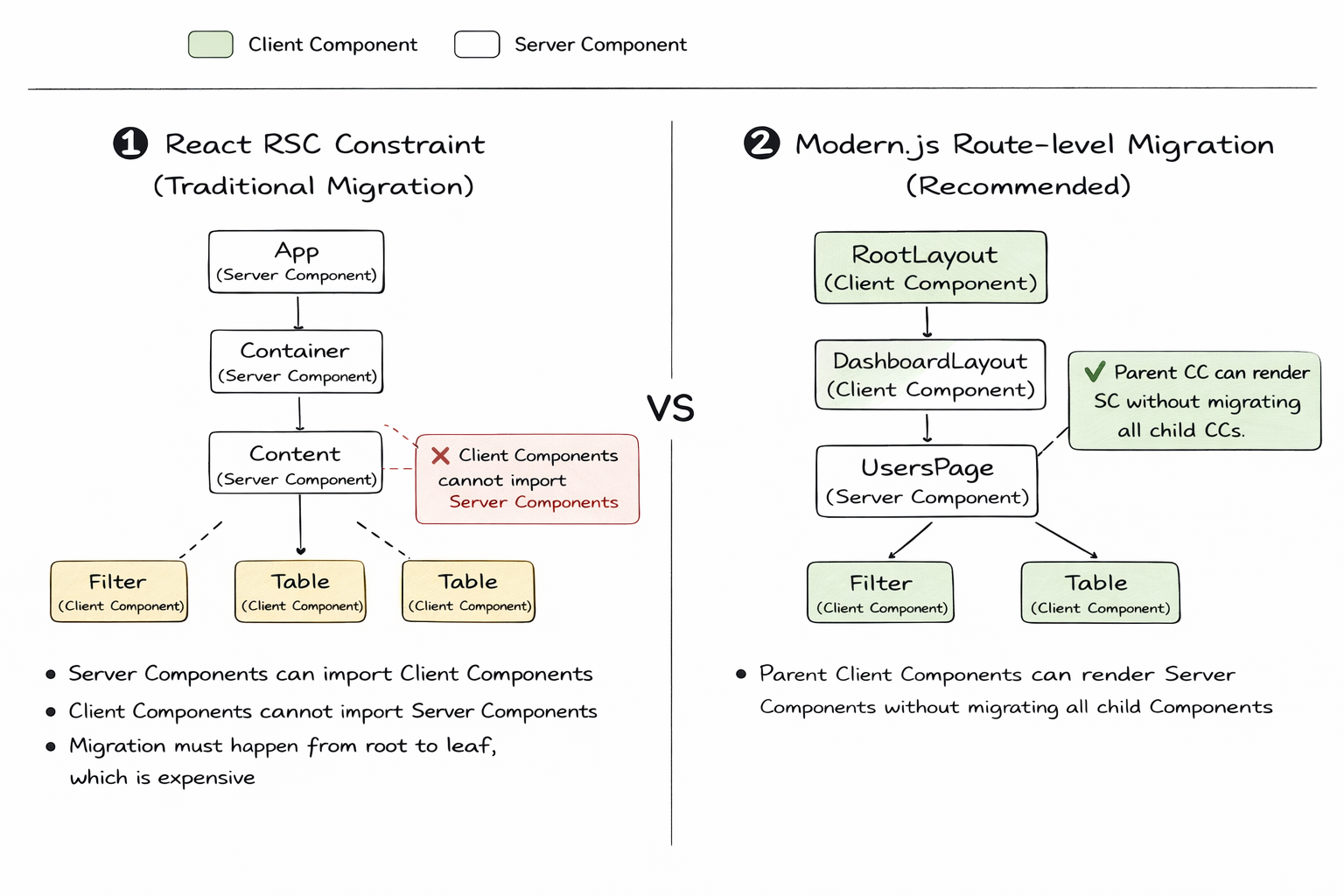
- In nested routing scenarios, the route component type is not affected by the parent route component type — developers can adopt Server Components starting from any route level.
Progressive Migration
With flexible component boundary control, Modern.js 3.0 provides a progressive migration path. Modern.js 3.0 allows Server Component migration at the route component level, without needing to migrate the entire component tree.
For more details on React Server Component, see: React Server Component
Embracing Rspack
Modern.js 3.0 removes webpack support, fully embraces Rspack, and upgrades to the latest Rspack & Rsbuild 2.0.
In 2023, we open-sourced Rspack and added support for Rspack as an optional bundler in Modern.js. Internally at ByteDance, over 60% of Modern.js projects have already switched to Rspack for building.
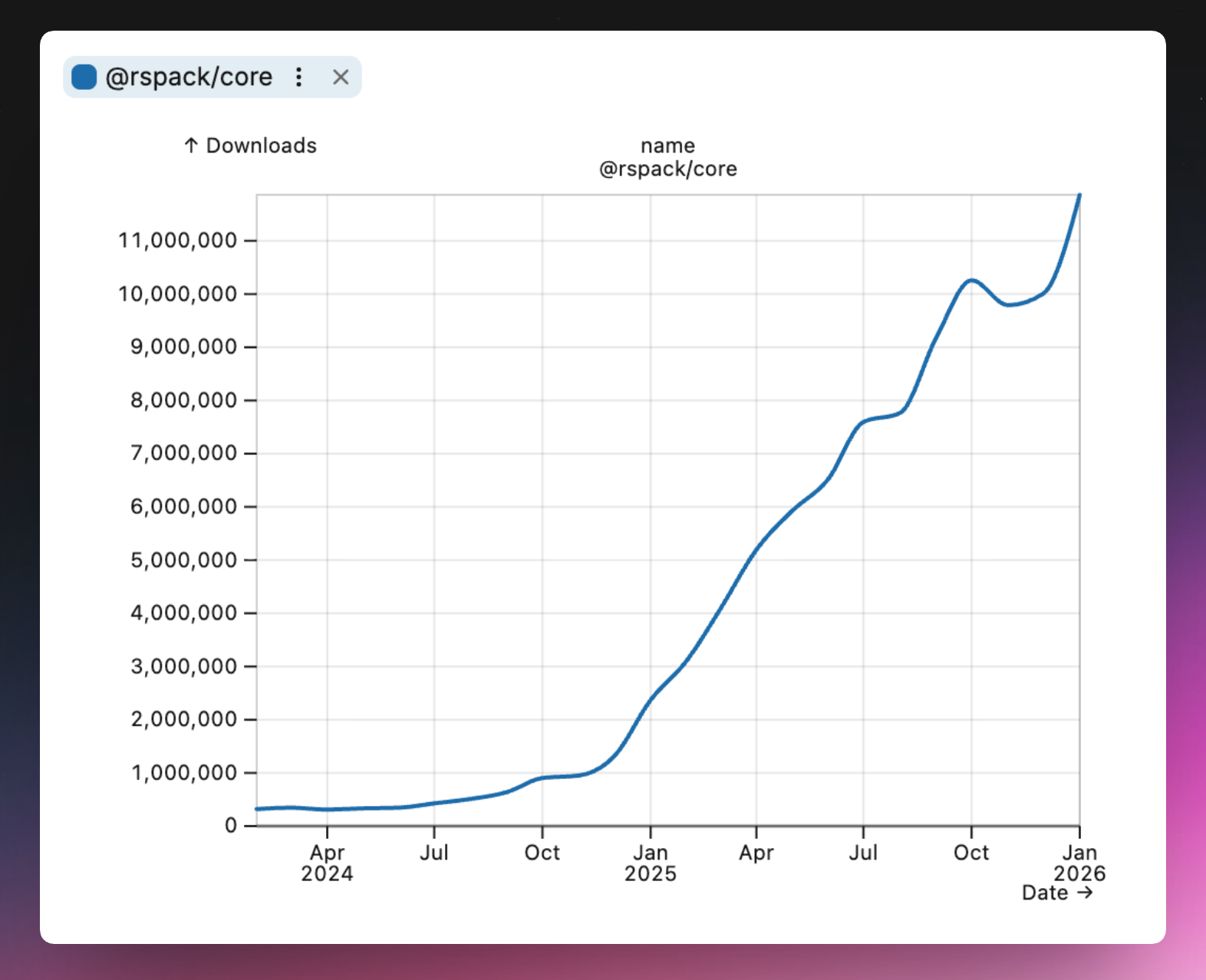
After more than two years of development, Rspack has surpassed 10 million monthly downloads in the community, becoming a widely adopted bundler in the industry. Meanwhile, Modern.js's Rspack build mode has also been continuously improved.
In Modern.js 3.0, we decided to remove webpack support, making Modern.js lighter and more efficient, while taking full advantage of Rspack's new features.
Smoother Development Experience
After removing webpack, Modern.js 3.0 better follows Rspack best practices, with improvements in build performance, installation speed, and more:
Underlying Dependency Upgrades
Modern.js 3.0 upgrades its underlying Rspack and Rsbuild dependencies to version 2.0, and optimizes default build configurations based on the new versions for more consistent behavior.
Refer to the following docs for details on underlying behavior changes:
Faster Build Speed
Modern.js leverages multiple Rspack features to reduce build time:
- Barrel file optimization enabled by default: 20% faster component library builds
- Persistent caching enabled by default: 50%+ faster non-initial builds
Faster Installation
After removing webpack-related dependencies, Modern.js 3.0 has significantly fewer build dependencies:
- 40% fewer npm dependencies
- 31 MB reduction in installation size
Smaller Build Output
Modern.js now enables multiple Rspack output optimization strategies by default, producing smaller bundles than webpack. For example:
Enhanced Tree Shaking
Enhanced tree shaking analysis can handle more dynamic import patterns, such as destructuring:
Constant Inlining
Cross-module constant inlining helps minifiers perform more accurate static analysis, eliminating dead code branches:
Full-Chain Extensibility
Modern.js 3.0 officially opens its complete plugin system, providing runtime and server plugins, along with flexible application entry handling.
Modern.js 2.0 offered CLI plugins and a beta version of runtime plugins, allowing developers to extend their projects. However, in practice, we found the existing capabilities insufficient for complex business scenarios.
Modern.js 3.0 provides more flexible customization capabilities, allowing full-lifecycle plugins for applications to help teams unify business logic and reduce duplicate code:
- CLI Plugins: Extend functionality during the build phase, such as adding commands and modifying configurations
- Runtime Plugins: Extend functionality during the rendering phase, such as data prefetching and component wrapping
- Server Plugins: Extend server-side functionality, such as adding middleware and modifying request/response
Runtime Plugins
Runtime plugins run during both CSR and SSR processes. The new version provides two core hooks:
onBeforeRender: Execute logic before rendering, useful for data prefetching and injecting global datawrapRoot: Wrap the root component to add global Providers, layout components, etc.
You can register plugins in src/modern.runtime.ts. Compared to manually importing higher-order components at the entry point, runtime plugins are pluggable, easy to update, and don't need to be imported repeatedly in multi-entry scenarios:
For more on runtime plugin usage, see the docs: Runtime Plugins
Server Middleware
In practice, we found that some projects need to extend the Web Server — for example, authentication, data prefetching, fallback handling, dynamic HTML script injection, and more.
In Modern.js 3.0, we rebuilt the Web Server using Hono and officially opened up server middleware and plugin capabilities. Developers can use Hono middleware to meet their needs:
For more on server plugin usage, see the docs: Custom Web Server
Custom Entry
In Modern.js 3.0, we redesigned the custom entry API to be clearer and more flexible than the previous version:
For more on entry usage, see the docs: Entries
Routing Improvements
Modern.js 3.0 includes React Router v7 built-in, provides config-based routing, and AI-friendly debugging capabilities.
Built-in React Router v7
In Modern.js 3.0, we upgraded to React Router v7 and deprecated built-in support for v5 and v6. This decision was based on the following considerations:
Version Evolution and Stability
React Router v6 was an important transitional version that introduced many new features (such as data loading and error boundaries). v7 further optimizes performance, stability, and developer experience while maintaining v6 API compatibility. As the React Router team positions Remix as an independent framework, the React Router core library is likely to be maintained long-term on v7, making it a more reliable choice.
Upgrade Path
- From v6: React Router v7 is a non-breaking upgrade for v6 developers. In Modern.js 2.0, we already provided React Router v7 plugin support, allowing you to progressively upgrade via the plugin, verify compatibility, and then migrate to Modern.js 3.0.
- From v5: There are significant API changes from v5 to v7. We recommend following the React Router official migration guide.
Config-Based Routing
In Modern.js, we recommend using convention-based routing to organize code. However, in real-world scenarios, developers occasionally encounter situations like:
- Multiple paths pointing to the same component
- Flexible route control
- Conditional routing
- Legacy project migration
Therefore, Modern.js 3.0 provides full config-based routing support, which can be used alongside convention-based routing or independently.
For more on config-based routing, see the docs: Config-Based Routing
Route Debugging
Run the npx modern routes command to generate a complete route structure analysis report in the dist/routes-inspect.json file.
The report displays each route's path, component file, data loader, error boundary, loading component, and other details, helping developers quickly understand the project's route configuration and troubleshoot routing issues. The structured JSON format is also easy for AI agents to understand and analyze, improving the efficiency of AI-assisted development.
For usage details, see the docs: Route Debugging
Server-Side Rendering
Modern.js 3.0 redesigned SSG capabilities, provides flexible caching mechanisms, and further improved fallback strategies.
Static Site Generation (SSG)
In Modern.js 2.0, we provided static site generation capabilities. This feature is well-suited for pages that can be statically rendered, significantly improving first-screen performance.
In the new version, we redesigned SSG:
- Data fetching uses Data Loader, consistent with non-SSG scenarios
- Simplified API with lower learning curve
- Better integration with convention-based routing
In the new version, you can use data loaders for data fetching, consistent with non-SSG scenarios. Then simply specify the routes to render in the ssg.routes configuration:
For more on SSG usage, see the docs: SSG
Caching Mechanism
Modern.js 3.0 provides caching mechanisms at different levels to help improve first-screen performance. All caches support flexible configuration, such as HTTP-like stale-while-revalidate strategies:
Render Cache
Supports caching the entire SSR result page, configured in server/cache.ts:
For render cache usage, see the docs: Render Cache
Data Cache
The new version provides a cache function that offers finer-grained data-level control compared to render cache. When multiple data requests depend on the same data, cache can avoid duplicate requests:
For more on data cache usage, see the docs: Data Cache
Flexible Fallback Strategies
Through practice, we have developed multi-dimensional fallback strategies:
Lightweight BFF
Modern.js 3.0 rebuilt the Web Server based on Hono, provides Hono-based integrated functions, and supports cross-project invocation.
Hono Integrated Functions
In Modern.js 3.0, we use Hono as the BFF runtime framework, allowing developers to extend the BFF Server using the Hono ecosystem and enjoy Hono's lightweight, high-performance advantages.
With useHonoContext, you can access the full Hono context, including request information and response headers:
Cross-Project Invocation
Previously, Modern.js BFF could only be used within the current project. We received developer feedback requesting the ability to use BFF across different projects. This is mostly due to migration and operation costs — reusing existing services is clearly more practical than extracting code and deploying a separate service.
To ensure developers get an experience similar to local integrated calls, we provide cross-project invocation capabilities.
For more on BFF usage, see the docs: BFF
Deep Integration with Module Federation
Modern.js 3.0 deeply integrates with Module Federation 2.0, supporting MF SSR and application-level module exports.
MF SSR
Modern.js 3.0 supports using Module Federation in SSR applications, combining module federation with server-side rendering to deliver better first-screen performance.
Combined with Module Federation's data fetching capabilities, each remote module can define its own data fetching logic:
Application-Level Modules
Unlike traditional component-level sharing, Modern.js 3.0 supports exporting application-level modules — modules with full routing capabilities that can run like independent applications. This is a key capability for micro-frontend scenarios.
Producer Exports Application
Consumer Loads Application
Through the wildcard route $.tsx, all requests to /remote/* are handled by the remote application, and the remote application's internal routing works normally.
For more on Module Federation usage, see the docs: Module Federation
Tech Stack Updates
Modern.js 3.0 upgrades to React 19, with Node.js 20 as the minimum supported version.
React 19
Modern.js 3.0 uses React 19 by default for new projects, with React 18 as the minimum supported version.
If your project is still using React 16 or React 17, please first complete the version upgrade following the React 19 official upgrade guide.
Node.js 20
As Node.js continues to evolve, Node.js 18 has reached EOL. In Modern.js 3.0, we recommend using Node.js 22 LTS and no longer guarantee support for Node.js 18.
Storybook Rsbuild
In Modern.js 3.0, we implemented Storybook for Modern.js applications based on Storybook Rsbuild.
Through a Storybook Addon, we convert and merge Modern.js configuration into Rsbuild configuration, and use Storybook Rsbuild to drive the build, keeping Storybook debugging aligned with development command configurations.
For more on Storybook usage, see the docs: Using Storybook
Using Biome
As community tooling continues to evolve, faster and simpler toolchains have matured. In Modern.js 3.0, new projects use Biome by default for code linting and formatting.
Upgrading from Modern.js 2.0 to 3.0
Key Changes
Upgrading to Modern.js 3.0 means embracing a lighter, more standards-aligned modern development paradigm. By fully aligning with mainstream ecosystems like Rspack and React 19, it eliminates maintenance pain points caused by legacy dependencies and significantly improves build and runtime performance.
Going forward, we will also provide more AI integrations and best practices based on Modern.js 3.0. Combined with the flexible full-stack plugin system, developers can reuse community knowledge with minimal learning cost, achieving a transformative improvement in development efficiency and modern application architecture.
For more improvements and changes, see the docs: Upgrade Guide
Feedback and Community
Finally, we once again thank every developer who has given us feedback and support. We will continue to communicate with the community and grow together.
If you encounter any issues, feel free to reach out through the following channels: